One prompt runs all of Spec Kit
I build web applications mostly alone, with Claude Code doing most of the heavy tasks.
Running Spec Kit on autopilot, with four stops for me
I build web products mostly alone, with Claude Code doing most of the typing. Spec Kit gave me a good process for that work: write the spec, plan it, break it into tasks, build, then check the code against the spec. The weak part was me. I was the one typing ten slash commands in order, reading every output and deciding what to run next.
So I wrote an agent loop that does the typing. It runs the whole Spec Kit pipeline from one Claude Code session and stops only when it needs a human decision. It finishes when /speckit-converge reports that the code matches the spec.
What Spec Kit gives you
Spec Kit is GitHub's toolkit for spec-driven development (SDD). You describe a feature, and a set of slash commands turns that description into files the agent works from:
| # | Command | Output |
|---|---|---|
| 1 | /speckit-constitution |
project principles |
| 2 | /speckit-specify |
spec.md: what to build and why |
| 3 | /speckit-clarify |
your answers folded into spec.md |
| 4 | /speckit-design |
design.md: screens, states, copy (my own step) |
| 5 | /speckit-plan |
plan.md |
| 6 | /speckit-checklist |
a requirements checklist |
| 7 | /speckit-tasks |
tasks.md |
| 8 | /speckit-analyze |
a read-only cross-check report |
| 9 | /speckit-implement |
the code |
| 10 | /speckit-converge |
"converged", or new tasks |
/speckit-design isn't part of Spec Kit. I added it for UI work. It's optional: features with no UI skip it, and so do projects that don't have the skill. Each command is good on its own. Running all of them by hand is slow, and late in the day it's easy to skip one.
How it works
The loop is one prompt you paste into a Claude Code session. That session becomes the orchestrator, and it never runs a Spec Kit command itself. For each step it starts a fresh subagent with one job and gets back a report of 10 lines or fewer. The rest of the subagent's transcript is thrown away, so the orchestrator's context grows by about ten lines per step and still has room at step 10.
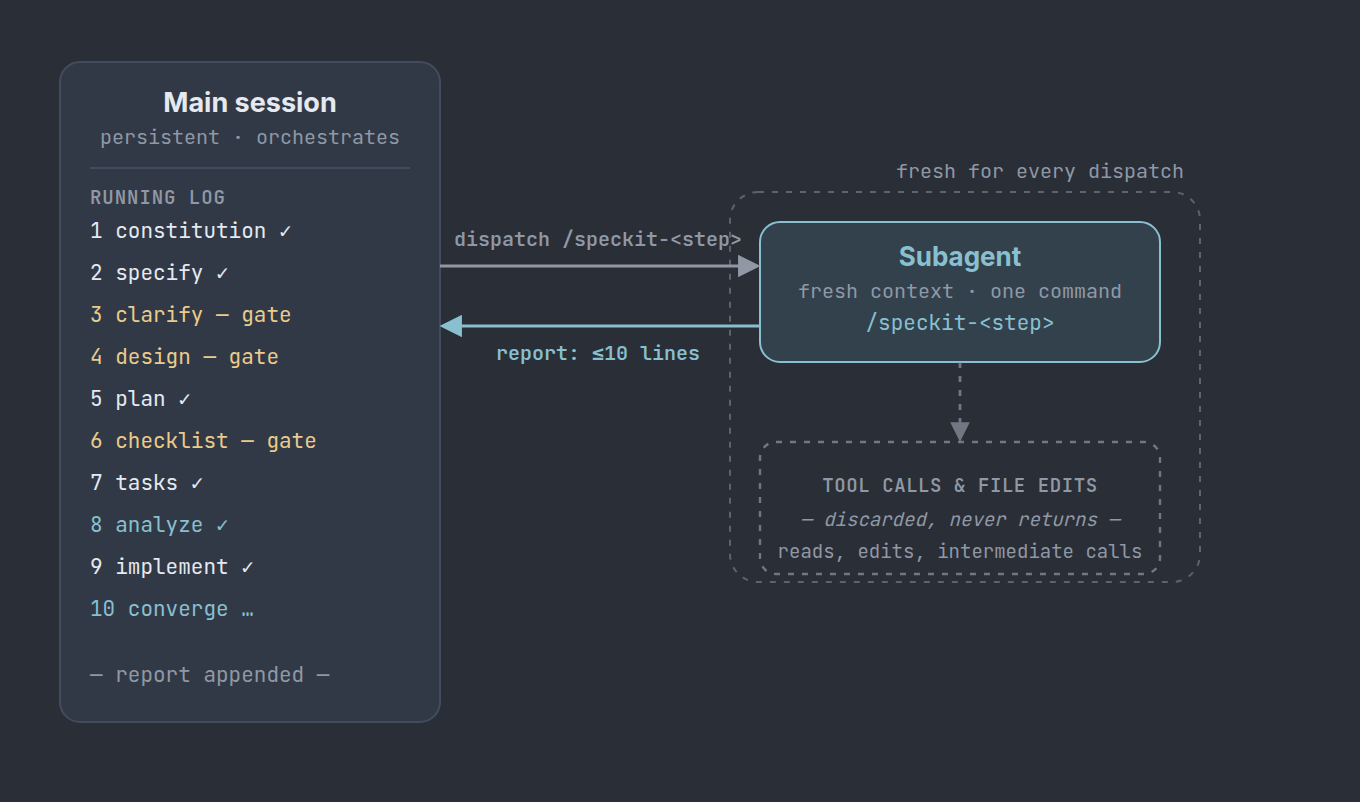
A run goes like this:
.specify/ is there, and looks for a paused run to resume.spec.md for screens or user-visible text. If there's none, the design step is skipped and the loop moves on. Otherwise the loop writes a design brief, I build the screens in Claude Design and paste the link, and we loop until I freeze the design.spec.md changed after the design step, the design is checked again first.AskUserQuestion tool, one question per modal, and a follow-up subagent writes my answer into the file.[P] tasks to separate subagents, at most five at a time.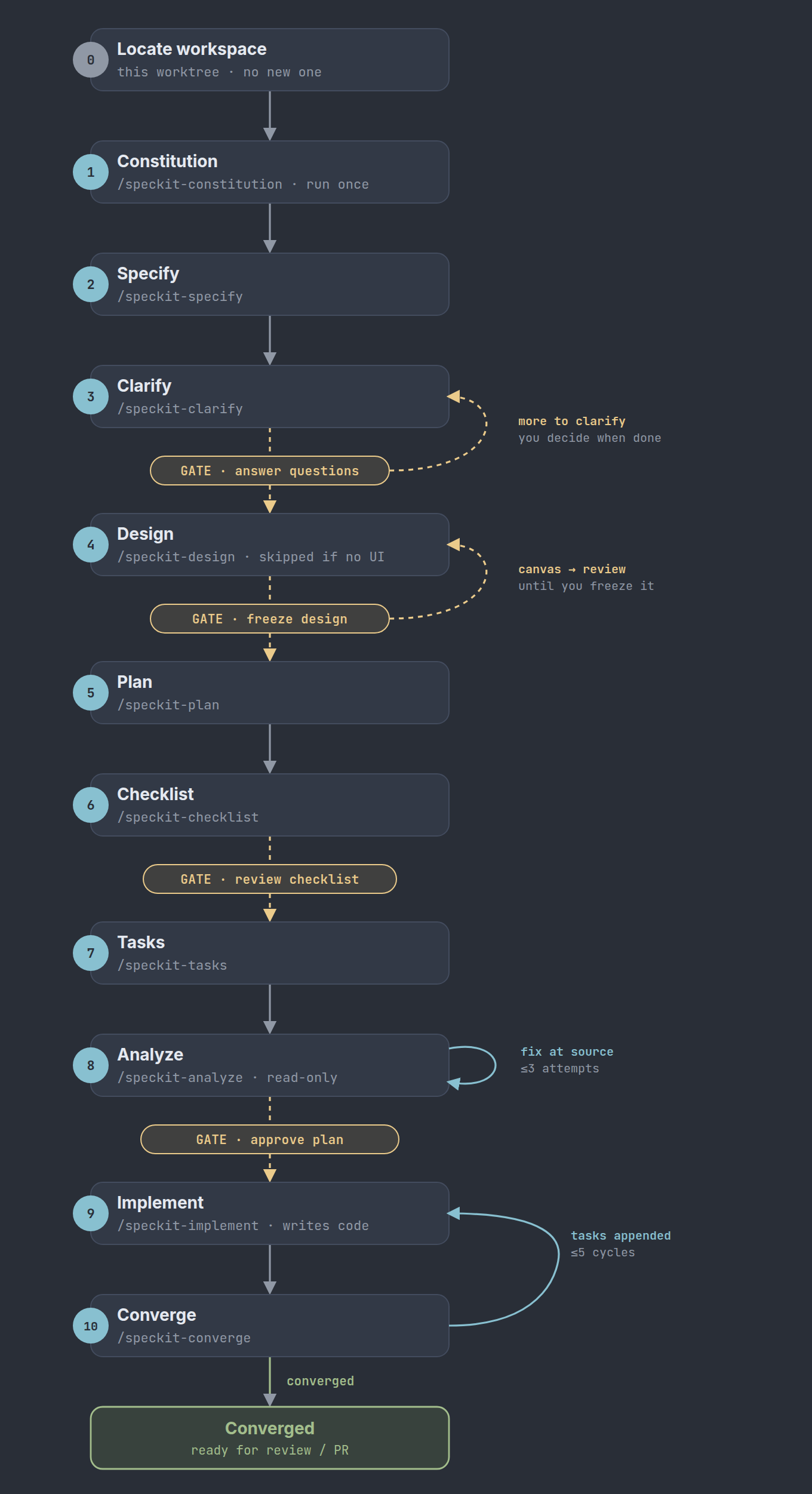
Pausing and resuming
After every report and every answer from me, the loop writes .specify/loop-state.json: current step, status, the pending question word for word, the retry counts and the design status (frozen or skipped). I can close the laptop in the middle of a gate.
Next time I open a session in the same worktree and paste the prompt. It reads the file, checks it against the real files, and asks the pending question again. Time away never counts as approval.
Try it
The full design, with diagrams and the complete operating prompt, is here: speckit-converge-loop.md.
| File | What it is |
|---|---|
| speckit-converge-loop.md | The operating prompt |
| speckit-design skill | Speckit design skill to collaborate with Claude Design |
To run it:
.specify/ folder and any custom skills (like speckit-design) on your main branch.Expect to change it. My gates fit my projects, and yours may belong somewhere else. Adding a step of your own is one more subagent dispatch for the orchestrator, plus a gate if it needs you. The parts I'd keep in any version: a fresh subagent per step, hard retry limits, absolute paths in every report, and only the orchestrator asking questions.